On this page
How to Optimize Content for Claude Search: Breaking Down Anthropic's Retrieval Pipeline
How Claude Search works: Brave Search indexing, BM25 term weighting, dense vector embeddings, and structuring self-contextualizing passages.
Many developers and technical writers share a common frustration today.
You spend weeks testing benchmarks and writing clear technical documentation. Then you ask Claude a direct question about your topic. Claude cites a weaker page, or gives an answer without crediting your work at all.
Old search assumptions held that ranking on Google’s first page brought visibility across the web. In Claude Search, that rule no longer applies.
Claude does not read your whole page.
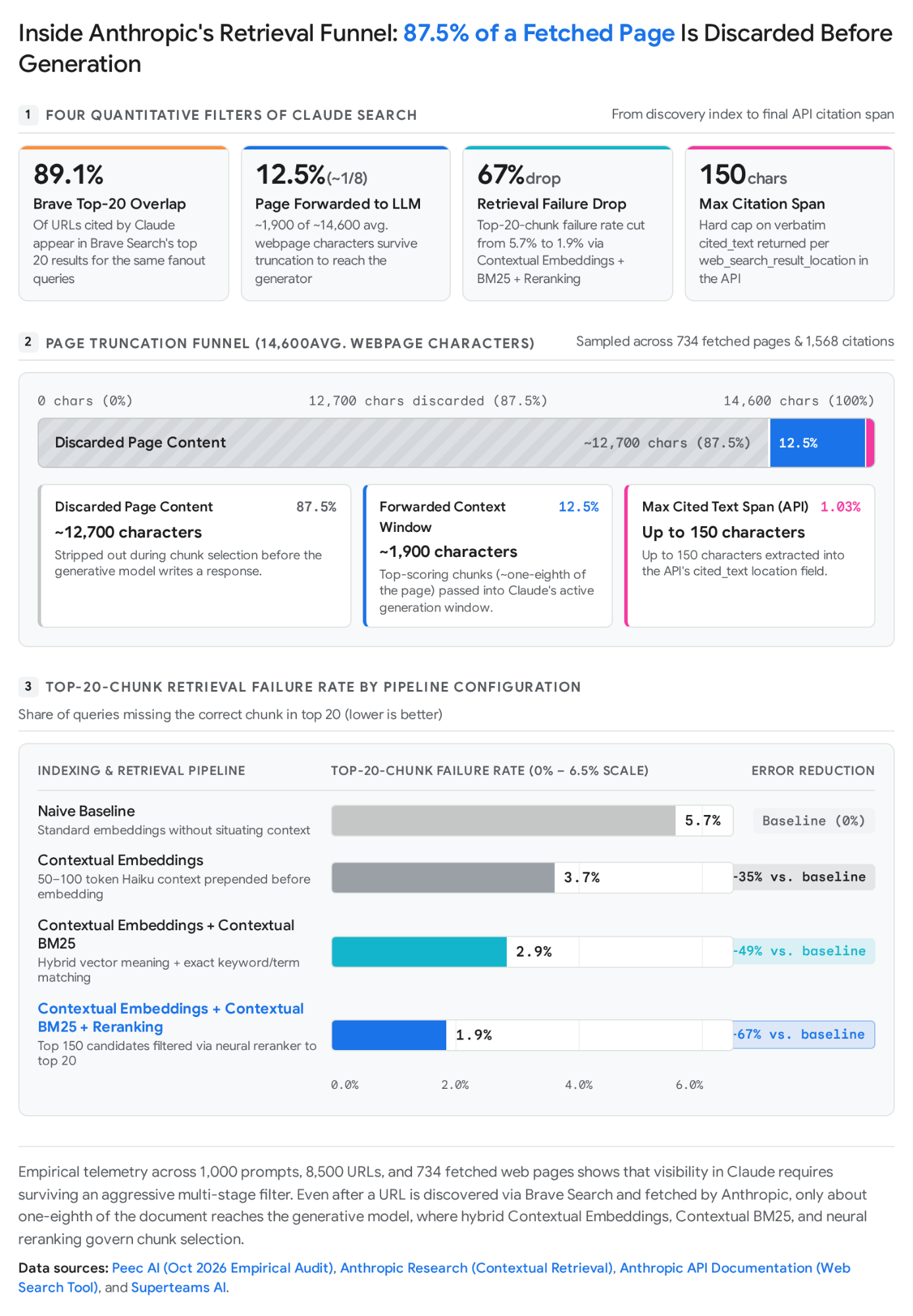
An October 2026 test by Peec AI’s study sampled 734 web pages and 1,568 live citations. It found that an average fetched page contains 14,600 characters.
Yet Claude forwards only ~1,900 characters (12.5%) to the main model. Claude throws away the other 87.5% before writing a single word.
Generic advice tells publishers to write good content, use clear headings, or add schema. That advice overlooks the actual ranking formulas and pruning code that evaluate your text.
This article breaks down how Anthropic’s search systems discover, process, and cite web pages.
We examine four primary technical sources: Anthropic API docs (including web_search_20260209 and web_search_20250305), Anthropic’s research paper on Contextual Retrieval, Merj’s audit of Brave Web Discovery Project (WDP), and findings from Peec AI’s study.
Getting your content cited by Claude depends on five technical steps:
- Brave Search indexing: 89.1% of Claude citations come from Brave Search top 20 results. Your page must pass Brave’s double-fetch verification.
- Crawler access: Your
robots.txtfile must allowClaude-SearchBotandClaude-User. - Query fanout: Claude expands prompts into multiple searches and filters candidate URLs with code.
- Passage scoring: Anthropic combines BM25 lexical scoring with vector search to select roughly 1,900 characters.
- Citation formatting: The model extracts exact claims under 150 characters for its linked source chips.
Understanding these steps gives you direct control over your visibility. You stop guessing and start writing pages that survive every automated filter.
How Brave Search Discovers and Indexes Pages for Claude
Before Claude can cite your page, Brave Search has to index it.
Claude does not query Google or Bing during live searches. Anthropic uses Brave Search as its search provider across its products.
Testing across 1,000 prompts, 1,000 search expansions, and 8,500 retrieved URLs through the Claude API confirmed this relationship.
The result was clear: 89.1% of URLs cited by Claude were already in Brave Search’s top 20 results for those exact searches.
If your site is not ranking in Brave Search, you lose nearly nine out of ten citation opportunities in Claude.
Why do pages ranking high on Google often fail to show up in Brave?
Brave maintains its own web index. It does not pull results from legacy search engines. It runs on search technology from its 2021 Tailcat acquisition alongside its own crawlers.
Because web crawling requires substantial infrastructure, Brave supplements its crawler with the Web Discovery Project (WDP).
WDP is an opt-in system built into the Brave browser. It sends anonymous data about visited pages and user searches, as detailed in Buffy’s review of Brave’s discovery patterns.
Researchers at Merj inspected the open-source codebase of the Web Discovery Project.
They found that Brave’s discovery checks are much stricter than Google’s. Many modern sites fail Brave’s checks without ever showing an error in Google Search Console, a gap explored in Bunny Honey’s discovery breakdown.
Analysis of Brave ranking shows that passing WDP verification is essential for getting indexed.
Query Channel vs. Page Channel Ingestion
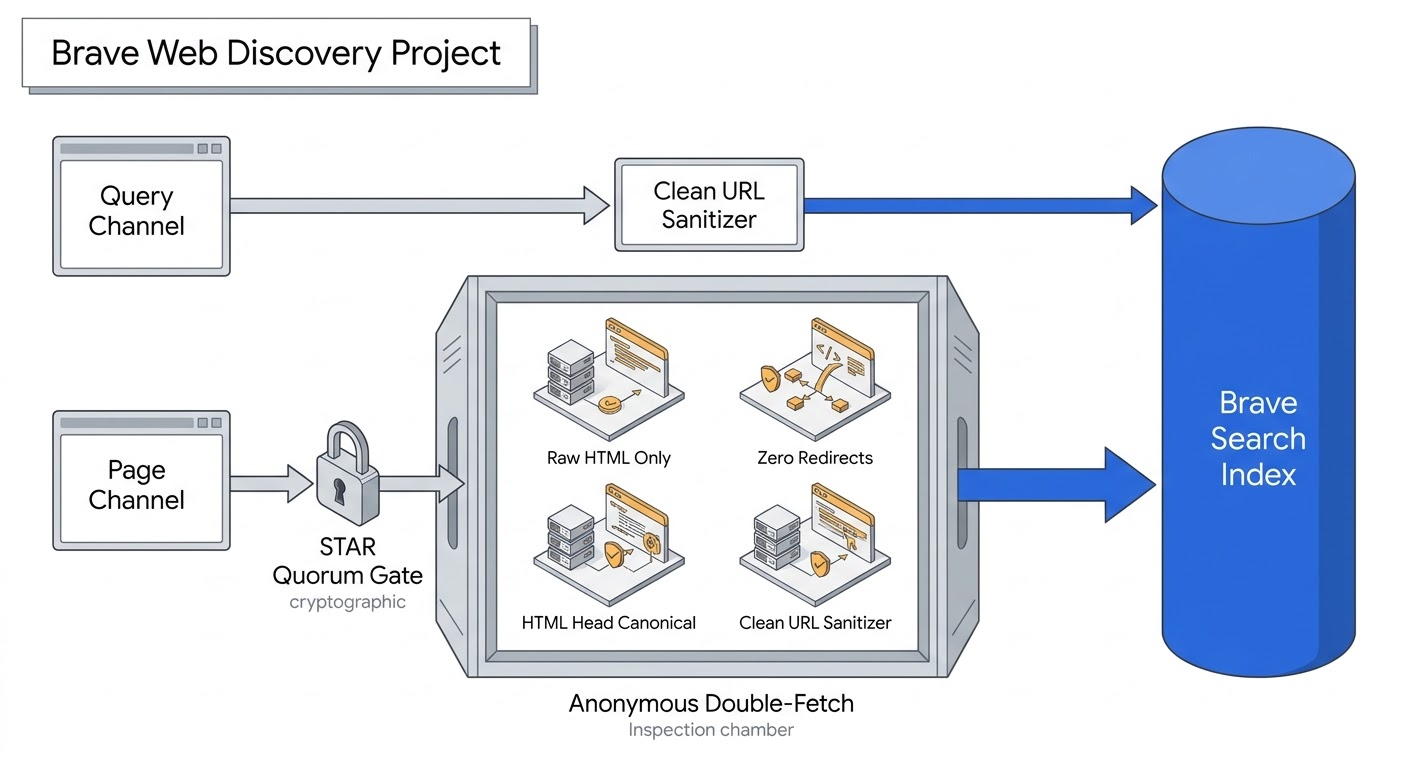
Brave’s client discovers new URLs through two distinct channels: the Query Channel and the Page Channel.
The Query Channel is the fastest way into Brave’s index.
When an opted-in user searches on Google, Bing, Yahoo, DuckDuckGo, or Brave, the browser logs the event locally.
The browser removes personal session details and re-fetches the search results page anonymously after 1 to 20 minutes.
It extracts the ranking URLs and titles. If at least 4 clean URLs pass validation, it reports them directly to Brave.
This path requires no multi-user quorum. A single search by one user is enough to feed your URL into Brave’s pipeline.
The Page Channel operates differently.
It triggers when an opted-in user visits your page directly in a standard browser tab.
To protect user privacy, WDP encrypts messages with a cryptographic system called STAR requiring a quorum of 20 reports.
Brave’s servers cannot decrypt the message until 20 separate users from different networks report the exact same URL.
Twenty visits from the same office Wi-Fi or household router count as only one report.
Only two URL types bypass this 20-network requirement: root homepages (like https://example.com/) and Brave Search referrals within two clicks from a search result.
| Discovery Rule | WDP Page Channel | WDP Query Channel |
|---|---|---|
| Trigger Event | User visits a webpage in a normal tab | User searches on Google, Bing, Yahoo, DuckDuckGo, or Brave |
| Sent Data | URL, title, canonical tag, text length, form count (no body text) | Search engine name, query, ranking URLs and titles |
| Engagement Limits | Max 100 mouse moves, 100 scrolls, 10 copies | Not applicable (page re-fetched after 1 to 20 min) |
| STAR Quorum | Needs 20 separate networks (different IPv4 last octets) | No quorum needed (1 search is enough) |
| Verification Fetch | Requires anonymous double-fetch check | Result URLs listed only; not fetched individually |
| Minimum Requirement | Must return HTTP 200, zero redirects, clean URL | At least 4 clean URLs on results page |
Passing the WDP Double-Fetch Verification
Getting visits from 20 networks is only the initial hurdle for new pages.
Before Brave accepts a page report, the visitor’s browser runs an anonymous double-fetch of the URL.
This verification confirms that the page is public and not an authenticated dashboard or private screen.
Audits of Brave’s code revealed five strict rules that cause pages to fail this check:
Zero HTTP Redirects Allowed: The anonymous fetch must return an immediate HTTP 200.
If your URL redirects (even a standard 301 redirect for a trailing slash or HTTPS normalization), WDP drops the page immediately.
10-Second and 2 MB Limits: The check aborts after 10 seconds and allows only 3 retries.
It inspects the content-length header and rejects any response over 2 MB.
Zero JavaScript Execution: The double-fetch reads raw HTML directly off the wire without running JavaScript.
If your site relies on client-side React or Vue to render body text, titles, or links, Brave sees an empty page.
If the raw HTML lacks titles or text that the user saw in their browser, WDP marks the page private and discards it.
Always use server-side rendering (SSR) or static pre-rendering for your main content.
HTML Head Directives Only (HTTP Headers Ignored): Aside from content length, WDP ignores HTTP response headers.
It never reads X-Robots-Tag or HTTP Link headers.
Any occurrence of noindex inside the HTML head discards the page. Canonical targets are evaluated exclusively from a <link rel="canonical"> tag placed directly in the server-rendered HTML head.
Strict Query Parameter Limits: WDP rejects URLs over 800 characters, hostnames over 50 characters, and paths containing words like login, checkout, admin, or account.
Without a clean canonical tag, WDP drops any URL with more than 1 query parameter or a query string over 22 characters.
With a clean canonical tag in the head, WDP accepts query strings up to 100 characters.
Maintaining clean, parameter-free URL structures protects your pages across both evaluation modes.
The Bravebot vs. Googlebot robots.txt Rules
Once your URLs pass discovery, Brave’s crawler must be allowed to fetch them.
Here, developers encounter conflicting documentation.
Industry crawler lists and server logs identify Brave’s crawler by the token Bravebot (or Bravebot/1.0), as summarized in the Transfon report.
Crawler profiles in the Trakkr directory and the Promptwatch audit confirm these user-agent strings.
Live telemetry on Cloudflare Radar monitors Bravebot activity across global networks.
An October 2026 study of 10,000 sites by Kuldeep Paul found that 5.3% of sites with a robots.txt file explicitly block Bravebot.
Yet Brave’s official crawler documentation states that its crawler checks whether Googlebot is allowed before crawling a page.
In Lantad’s audit of 1,025 robots.txt files, 126 of 128 sites that blocked AI crawlers left Googlebot allowed, leaving the door open for Brave.
However, if your firewall blocks unknown bots or your robots.txt has strict whitelist rules, Brave crawls can fail silently.
Keep both Googlebot and Bravebot allowed in robots.txt.
Submit your homepage at search.brave.com/submit-url so Brave can map your internal links from the root.
As explained in the scale-xpert walkthrough, track Brave traffic in GA4 by creating a custom channel where the source matches search.brave.com.
# robots.txt configuration for Claude Search and Brave discovery
User-agent: ClaudeBot
Disallow: /

User-agent: Claude-SearchBot
Allow: /

User-agent: Claude-User
Allow: /

User-agent: Bravebot
Allow: /

User-agent: Googlebot
Allow: /
Managing Anthropic’s Three Search Bots in robots.txt
Ranking in Brave places your URL into Claude’s candidate list.
Next, Anthropic’s own search bots fetch and read your page content.
In 2024, many publishers copied blanket block rules into their robots.txt files to prevent AI training.
In doing so, they accidentally blocked search bots and user citation agents too.
Anthropic splits its crawlers into three distinct bots, detailed in Byfaro’s bot architecture overview:
| User-Agent Token | Role in Pipeline | Honors robots.txt? | Impact of Blocking | Recommended Setting |
|---|---|---|---|---|
ClaudeBot | Collects web data for model training | Yes | Stops training collection; does not affect search | Optional: Safe to block if opting out of training |
Claude-SearchBot | Crawls and indexes pages for Claude Search results | Yes | Reduces your visibility in search results | Mandatory Allow: / |
Claude-User | Fetches pages live when a user prompt requests a URL | Yes | Blocks Claude from reading your page during live chats | Mandatory Allow: / |
Anthropic gives site owners direct control.
All three bots, including Claude-User, strictly obey robots.txt disallow rules and Crawl-delay commands.
Because robots.txt rules match specific user agents, blocking ClaudeBot only stops training data collection.
Anthropic’s updated crawler guidance makes bot rules granular.
You can safely block ClaudeBot while keeping Claude-SearchBot and Claude-User allowed.
The Elementera audit highlights how targeted permissions protect citable content.
Do not block Anthropic bots at the firewall level.
IP blocks prevent bots from reading your robots.txt file in the first place.
Instead, control access with robots.txt. Network telemetry in the Centinel report recommends verifying official IP ranges using Anthropic’s public file at claude.com/crawling/bots.json.
HTTP Markdown Negotiation vs. llms.txt
Many developers ask if adding an llms.txt file helps Claude cite their pages.
Anthropic’s documentation makes this clear: Anthropic does not use llms.txt as a ranking or citation signal.
Independent findings in the airanklab analysis confirm that Claude relies on live web fetchers rather than root text files.
While maintaining an llms.txt file can help developers find docs, it does not improve search visibility in Claude.
Anthropic supports something much more useful: HTTP Markdown content negotiation.
When Claude’s live fetcher requests a page, it sends an HTTP Accept header asking for Markdown (text/markdown).
If your server checks the Accept header and sends clean Markdown instead of bloated HTML with menus, ads, and scripts, you remove clutter before Claude divides your text into chunks.
GET /blog/how-to-optimize-content-for-claude-search/ HTTP/1.1
Host: webspecification.com
User-Agent: Mozilla/5.0 (compatible; Claude-User/1.0; +https://support.anthropic.com/en/articles/8896518-what-is-claudebot-and-how-do-i-manage-it)
Accept: text/markdown, text/html;q=0.9
Query Expansion and Dynamic Code Filtering in Claude
When someone asks a question on claude.ai, Claude does not simply pass the user’s raw prompt to Brave Search.
Claude decides if current data is needed, then calls its server-side web_search tool.
Technical breakdowns of the Search API show that this tool executes server-side searches before synthesis begins.
Practical workflows in Jahanzaib’s Python reference demonstrate how the Messages API handles tool calls.
The open-source search reference maps how Claude manages tool execution across providers.
Two main steps happen during this search:
Query Fanout: Breaking One Prompt Into Multiple Searches
Claude breaks the user’s question into multiple targeted fanout searches.
Simple questions trigger 1 to 3 searches.
Complex research questions can run 10 or more searches across multiple rounds.
Claude removes casual words and adds specific terms, such as the current year, product names, and exact technical measurements.
If your page only targets broad head terms and misses exact technical identifiers, you will miss Brave’s top 20 for these expanded searches.
Dynamic Python Filtering in web_search_20260209
Starting with tool version web_search_20260209 on modern Claude models, Anthropic updated how results are handled.
Instead of dumping all search results into the prompt, Claude uses dynamic filtering.
In the background, Claude writes small snippets of code in a secure sandbox to filter, clean, and score search results before adding them to its context window.
Developers building custom tools can also set allowed_domains or blocked_domains to focus searches on authoritative sources.
Every search result returned to Claude includes a page_age field showing when the page was updated.
Adding clear, machine-readable publication and update dates in your HTML helps Claude confirm your content is fresh.
Chunk Extraction: Why Claude Drops 87.5% of Page Text
Once Claude fetches your page, your text meets the strictest filter in the system.
In real-world benchmarks, researchers compared full HTML pages with the exact text Claude passed to its generative model across 734 pages and 1,568 citations.
The numbers are clear: an average fetched webpage contains ~14,600 characters.
Claude forwards only ~1,900 characters (about one-eighth) to the generator. It cuts the remaining 87.5%.
Claude chooses which text to keep using Contextual Retrieval and a hybrid scoring system combining BM25 exact word matching, vector embeddings, and neural reranking.
How Contextual Retrieval Preserves Passage Context
Standard AI search systems cut long articles into small text chunks, a challenge analyzed in SemDB’s chunking analysis.
When a chunk is separated from its section header, it loses its meaning.
Anthropic gave a clear example: a chunk stating The company revenue grew by 3% fails to match a search for ACME Corp Q2 2023 revenue.
The company name and quarter were in the header above, but the chunk itself used generic words.
In September 2024, Anthropic created Contextual Retrieval to solve this problem, detailed in the DataCamp analysis.
Replications in the Forge benchmark show that contextualization helps recover lost semantic signals.
Before saving chunks into a search index, Anthropic passes the full document and the target chunk to a fast model with a prompt:
Here is the chunk we want to situate within the whole document: {CHUNK_CONTENT}. Answer only with the succinct context to situate this chunk within the overall document for the purpose of improving search retrieval of the chunk. Answer only with the succinct context and nothing else.
This creates a 50 to 100-token context prefix like: [Context: This passage is from an earnings report for ACME Corp in Q2 2023].
Anthropic prepends this prefix to the chunk before indexing it.
Using prompt caching, Anthropic calculated this preprocessing cost at just $1.02 per million document tokens.
The results speak for themselves.
Starting from a baseline failure rate of 5.7%, adding Contextual Embeddings cut retrieval failures by 35% (down to 3.7%).
Adding Contextual BM25 cut failures by 49% (down to 2.9%).
Adding neural reranking cut total failures by 67% (down to 1.9%).
Retrieval Benchmarks Across 1,568 Live Citations
Retrieval Failure Rate Reduction
-67% Total DropTop-20 chunk failure rate across retrieval configurations (Anthropic Contextual Retrieval study)
Chunk Selection Accuracy by Algorithm
Tied #1Percentage of times algorithm correctly isolates cited target passage (Peec AI, N = 1,568 Citations)
Why Repetitive Boilerplate Degrades Search Reranking
An independent replication on the Atreyu4EVR dataset across 41,995 text chunks and 152 questions found an important risk when using contextual retrieval.
Contextual additions help most when a chunk omits the main topic name.
However, when researchers added the exact same summary sentence to every chunk in a section, performance crashed.
Because every chunk started with identical text, the chunks looked too similar in vector space.
Reranking backfired, dropping top-1 recall from 77% down to 53%.
The lesson for writers is straightforward: do not repeat generic intro text across every section of an article.
If every H2 section starts with the same summary sentence, reranking algorithms fail to distinguish your chunks.
Instead, write self-contained paragraphs that include specific topic names, version numbers, and metrics directly in the text.
Real-World Signals Behind Claude’s BM25 Implementation
Does Claude actually run BM25 keyword matching during live web searches?
Four clear pieces of evidence confirm that it does:
First, Anthropic’s research shows that combining BM25 with embeddings beats embeddings alone, dropping failures from 3.7% to 2.9%.
Second, BM25 runs fast with low computing overhead compared to generating heavy neural vectors for every chunk of a newly fetched page.
Third, competing search systems (such as ChatGPT Search logs) show bm25 scores during passage ranking.
Fourth, Anthropic uses Turbopuffer, a vector search provider that recommends combining vector search with BM25 full-text indexing.
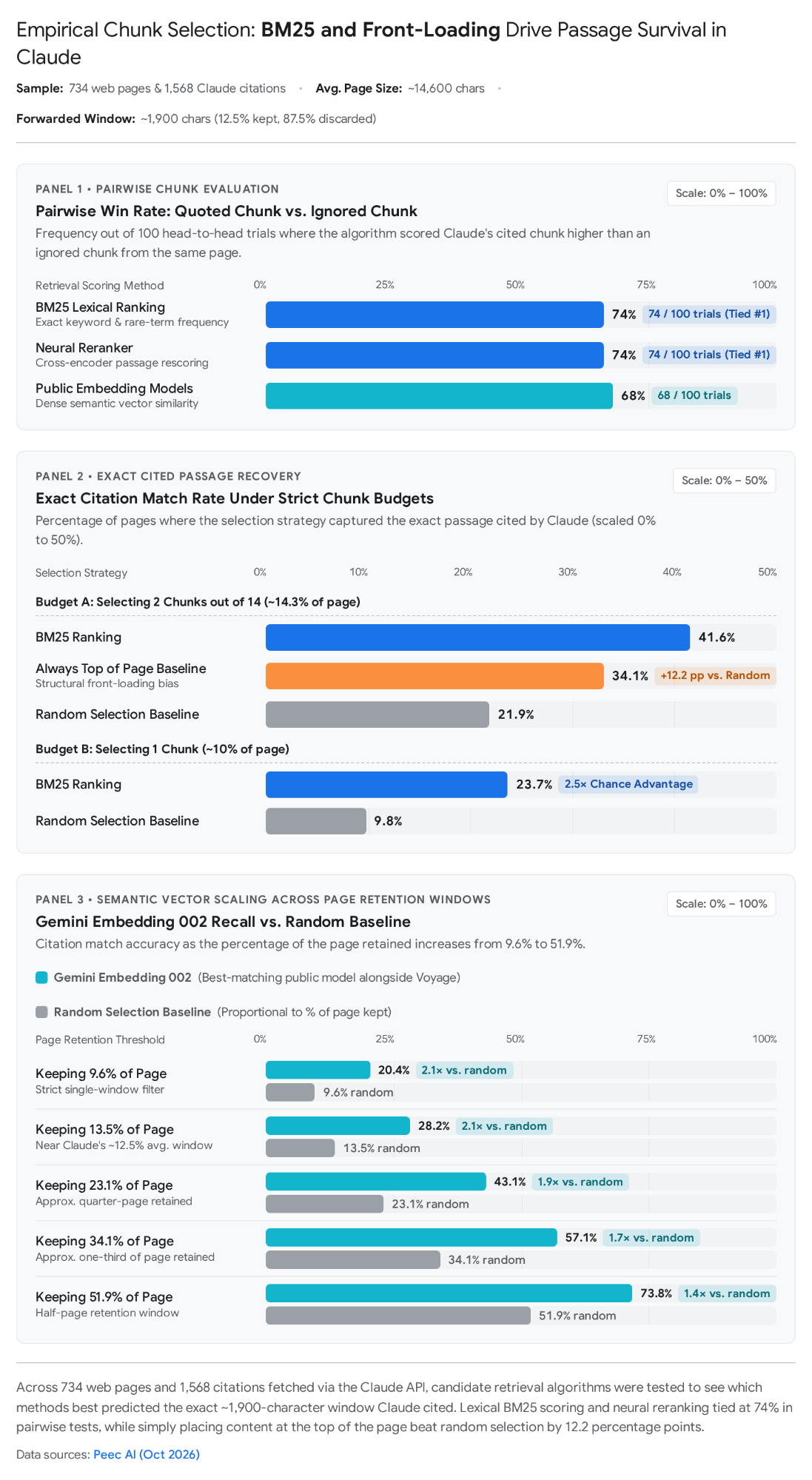
In head-to-head tests comparing a cited chunk against an ignored chunk from the same page, BM25 picked the winning chunk 74 out of 100 times (74%).
A neural reranker tied at 74%, while standalone embedding models scored only 68%.
When the algorithm could select only 2 chunks out of 14, BM25 found Claude’s exact cited quote 41.6% of the time, beating random selection by almost double.
The study also found a clear top-of-page advantage.
A simple rule that always picked chunks from the very top of the page matched Claude’s cited text 34.1% of the time.
Front-loading your main conclusions in the opening paragraphs matches how Claude samples fetched pages.
Among 12 off-the-shelf embedding models tested against Claude citations, Voyage and Gemini (Embedding 002) scored highest.
This matches Anthropic’s paper, which named Voyage and Gemini as the strongest embedding families in their tests.
BM25 works using three simple rules:
- 1. Inverse Document Frequency (IDF): Rare words like
web_search_20260209orcontent-lengthget high scores. Common words likearticleget low scores. - 2. Term Frequency Saturation (k1): Repeating a keyword yields diminishing returns. Mentioning a term 2 or 3 times gives maximum credit. Mentioning it 10 times gives almost nothing extra.
- 3. Length Normalization (b): Longer chunks get penalized. Long rambling text gets discounted compared to short, focused passages.
BM25 Score(D, Q) = Σ [ IDF(qi) * f(qi, D) * (k1 + 1) ] / [ f(qi, D) + k1 * (1 - b + b * (|D| / avgdl)) ]where:
IDF(qi)scores rare, specific terms higher.k1(typically 1.2 to 2.0) limits the value of repeated keywords.b(typically 0.75) penalizes long, rambling chunks.
Because BM25 rewards specific words and embeddings reward clear meaning, write for both.
Avoid vague pronouns like it, this method, or our solution.
Use clear names like Anthropic’s web_search_20260209 tool or Brave’s Web Discovery Project so each chunk stands on its own.
Use exact numbers, dates, and version strings. Keep paragraphs concise so the length penalty does not lower your score.
Formatting Text for the 150-Character Citation Span
Passing the 1,900-character cut gets your passage into the model’s context window.
The final step is turning that retrieved text into a clickable source chip on claude.ai or an API citation object.
Standard definitions of the citation format show that citations attach directly to generated claims.
Anthropic’s Messages API shows the exact rules governing citations.
When a search finishes, the API returns a web_search_tool_result containing an array of sources with URLs, titles, and encrypted text.
As Claude generates its response, it attaches citation objects of type web_search_result_location.
Each citation object contains four fields: url, title, encrypted_index, and cited_text.
cited_text is an exact quote of up to 150 characters from your page supporting the claim.
{
  "type": "web_search_result_location",
  "url": "https://webspecification.com/blog/how-to-optimize-content-for-claude-search/",
  "title": "How to Optimize Content for Claude Search",
  "cited_text": "Claude Search forwards only ~1,900 characters (12.5%) of an average 14,600-character webpage to the generative model, discarding the remaining 87.5%."
}
Two rules in Anthropic’s citation system shape how you should write sentences:
First, citations are enabled by default in web search. The cited_text snippets do not count toward API token usage.
Live tests in the benchr evaluation show that citing exact source spans grounds responses without token overhead.
Second, because cited_text is capped at 150 characters (about 20 to 25 words), Claude looks for clear, self-contained sentences stating a complete fact.
If your point is spread across three long sentences, Claude cannot extract a clean 150-character quote.
Compare how a rambling paragraph transforms into an optimized passage that wins BM25, embeddings, and the 150-character quote limit:
| Passage Attribute | Unoptimized Text (Fails Retrieval & Citation) | Optimized Text (Wins BM25, Embeddings & cited_text) |
|---|---|---|
| Text Sample | When you examine how the search system operates, it actually does not read the whole page that it finds. In fact, most of the text on a typical article gets left behind during the first step, and only a tiny fraction of around nineteen hundred characters ever gets sent over to the model to write the final answer. | Claude Search forwards only ~1,900 characters (12.5%) of an average 14,600-character webpage to the generative model, discarding the remaining 87.5%. |
| Character Count | 334 characters (Exceeds the 150-character limit by 184 characters) | 149 characters (Fits inside a single 150-character quote verbatim) |
| Topic Clarity | Weak: Uses vague words like the search system and it | Strong: Explicitly names Claude Search and generative model |
| Keyword Density | Weak: Conversational words trigger BM25’s length penalty | Strong: Packs high-value numbers (~1,900, 12.5%, 14,600-character, 87.5%) into 21 words |
Frequently Asked Questions
Does Claude Search query Google or Bing?
No. Anthropic routes live search queries through Brave Search rather than Google or Bing. Live API tests show that 89.1% of URLs cited by Claude rank within Brave Search’s top 20 results for those queries.
How much of a web page does Claude Search read?
Claude does not feed entire pages into its generative context window. Out of an average 14,600-character crawled document, Anthropic’s retrieval pipeline discards roughly 87.5% of boilerplate text and retains only about 1,900 characters (12.5%) for candidate scoring.
Which user-agents must be allowed in robots.txt for Claude Search?
To be cited in Claude Search, your robots.txt file must allow Claude-SearchBot, Claude-User, and Bravebot. You can block ClaudeBot without hurting search citations, because Anthropic reserves ClaudeBot strictly for model training rather than search retrieval.
How does Anthropic Contextual Retrieval score web passages?
Anthropic combines BM25 lexical term matching with dense vector embeddings. BM25 catches exact keyword tokens and rare acronyms, while vector embeddings capture conceptual similarity. Anthropic adds a 50-100 token situating prefix to each chunk, cutting retrieval failure rates by 67%.
What is the maximum character limit for Claude cited snippets?
Anthropic caps the cited_text field in citation objects at 150 characters (approximately 20 to 25 words). Claims must be expressed in atomic, self-contained sentences that Claude can lift verbatim into its linked source chips.
Why do pages ranking on Google fail to appear in Claude Search?
Brave Search maintains an independent index powered by its Web Discovery Project (WDP). WDP uses anonymous browser telemetry and requires double-fetch GET 200 verification. Sites with slow response times over 10 seconds, client-side JavaScript rendering, or missing server-side meta tags often fail Brave’s verification even if they rank on Google.
10-Point Claude Search Readiness Checklist
Use this ten-point checklist to test your key technical pages:
- 1. Allow Search Bots in robots.txt: Verify that
Googlebot,Bravebot,Claude-SearchBot, andClaude-Userare allowed (Allow: /). If you want to block AI training, disallow onlyClaudeBot(Disallow: /). - 2. Use robots.txt Instead of IP Blocks: Avoid CDN or firewall IP blocks that stop crawlers from reading
/robots.txt. Verify real Anthropic crawlers usingclaude.com/crawling/bots.json. - 3. Remove Redirect Chains: Make sure pages return an immediate
HTTP 200. Avoid blocked URL words likelogin,checkout,admin, oraccount. - 4. Place Canonical Tags in HTML Head: Because Brave WDP ignores HTTP headers, put your canonical tag and robots meta tags directly inside the server-rendered HTML head.
- 5. Render HTML on the Server: Avoid client-side JavaScript rendering for primary text and links. Keep HTML responses under 2 MB and initial response times under 10 seconds.
- 6. Support HTTP Markdown Negotiation: Configure your server to check the Accept header on requests from
Claude-Userand return cleantext/markdownwhen requested, a pattern explored in our breakdown of agent-ready web architecture. - 7. Submit Your Site to Brave Search: Submit your homepage at
search.brave.com/submit-url. Set up a GA4 channel matching search.brave.com to track referral traffic. - 8. Front-Load Key Findings: Top-of-page text wins 34.1% of citations in chunk tests. Place your main conclusions and numbers in your opening two paragraphs.
- 9. Write Self-Contained Paragraphs: Avoid vague pronouns like it or this method. Name specific products, version numbers, and dates in every section.
- 10. Include 150-Character Claim Sentences: Write clear, factual claim sentences under 150 characters that Claude can lift verbatim into
cited_textsource chips.
Written by
Platform Engineer and Technical Writer with 10+ years of full-stack development experience and 2+ years focused on DevOps and platform engineering.