On this page
Well-Known URIs in Production: Deploying security.txt and A2A agent-card.json
Deploy RFC 8615 /.well-known/ endpoints without silent CDN failures. Covers RFC 9116 security.txt, A2A agent-card.json, and MCP routing.
Executive Summary (TL;DR)
- The Core Mechanism: Defined in RFC 8615, the
/.well-known/path prefix is the standardized root namespace where browsers, security scanners, and autonomous AI agents retrieve origin-wide policy and capability metadata. - The "Green-Build, Broken-Edge" Paradox: Well-known files frequently pass local builds yet fail silently in production because Single-Page Application (SPA) catch-all routers return HTML shells, static build pipelines strip dot-prefixed directories, or CDN edge rules overwrite
Content-Typeheaders. - Actionable Baseline: Every public domain should serve a non-expired
/.well-known/security.txt(RFC 9116), while domains exposing autonomous AI capabilities should publish/.well-known/agent-card.json(A2A Protocol) and redirect legacyagent.jsonrequests via HTTP 301.
Production Reference Card
- Registered Standards (Permanent)
security.txt(RFC 9116),change-password(RFC 8809),mta-sts.txt(RFC 8461),host-meta(RFC 6415),openid-configuration,webfinger,assetlinks.json- Provisional / Specification Track
gpc.json(W3C),did.json(W3C),agent-card.json(A2A Protocol). Unregistered conventions:llms.txt,ai.txt.- Core Specifications
- RFC 8615 (Well-Known URIs), RFC 9116 (security.txt), RFC 8809 (change-password), RFC 8461 (MTA-STS)
- Primary Failure Modes
- SPA catch-all returning HTML shells, incorrect
Content-Typeheaders, CDN edge rewrites overriding origin headers, expiredsecurity.txttimestamps, legacyagent.jsonpaths - Last Registry Verification
- 1 November 2026 against the official IANA Well-Known URIs registry. Next scheduled review: 30 November 2026.
The /.well-known/ directory is the front door for automated discovery on the modern web.
Defined in RFC 8615, this reserved URI path prefix gives security researchers, password managers, identity providers, and autonomous AI agents a single predictable location to query origin-wide policy and service metadata without scraping HTML or guessing URLs.
In production, however, /.well-known/ endpoints suffer from the “Green-Build, Broken-Edge” Paradox: a metadata file can exist in your Git repository, pass your CI build, and work on localhost, yet fail completely at the public edge.
Why? Modern deployment stacks introduce three silent failure points between your repository and the requesting client:
- SPA Catch-All Interception: Client-side routers (Next.js, Remix, Vite, Vue Router, SvelteKit) intercept unmatched routes and return a
200 OKHTML application shell (<!DOCTYPE html>) instead of the raw metadata file. - CDN MIME-Type Overwrites: Edge proxies and caching layers default unrecognized extensions or dot-prefixed paths to
text/htmlinstead oftext/plainorapplication/json. - Dotfile Build Stripping: Static site generators and object storage sync scripts silently ignore dot-prefixed folders (
.well-known) during artifact bundling.
When any of these occur, automated parsers abort immediately without alerting your monitoring stack.
Audience & Prerequisites: This guide is written for cloud developers, DevOps teams, web architects, and AI systems developers managing production domains on modern edge platforms (Cloudflare Pages, Vercel, Netlify, Nginx). Familiarity with HTTP response headers, DNS records, and CI/CD pipelines is assumed.
What to deploy: The /.well-known/ Production Matrix
The /.well-known/ production matrix maps each well-known URI suffix to its governing specification, IANA registration status, required HTTP response behavior, and deployment priority:
| Suffix | Standard | Status | Target HTTP Response | Priority |
|---|---|---|---|---|
security.txt | RFC 9116 | Permanent | 200 OK (text/plain; charset=utf-8) with future Expires timestamp | Every public domain |
change-password | RFC 8809 | Permanent | 302 or 303 redirect to credential update route | Sites with user authentication |
agent-card.json | A2A Protocol | Spec track | 200 OK (application/json) declaring agent skills and auth schemes | Sites exposing AI agent services |
gpc.json | W3C GPC | Provisional | 200 OK (application/json) returning {"gpc": true} | Sites honoring Sec-GPC signals |
mta-sts.txt | RFC 8461 | Permanent | 200 OK (text/plain) enforcing TLS for inbound SMTP | Domains operating MX mail servers |
Two-minute terminal diagnostic check
Before modifying configuration files, verify what your public edge actually delivers to external clients right now.
Never test /.well-known/ endpoints against localhost alone: local dev servers bypass CDN header rewrites and edge routing rules.
Run this 4-step diagnostic script against your production domain:
# 1. Verify HTTP status, Content-Type, and X-Content-Type-Options at the edge
curl -sI https://webspecification.com/.well-known/security.txt \
  | grep -Ei "^HTTP|content-type|x-content-type"

# 2. Inspect the first 20 bytes to catch SPA HTML fallback shells
curl -s https://webspecification.com/.well-known/security.txt | head -c 20

# 3. Confirm the mandatory RFC 9116 Expires field is present and in RFC 3339 format
curl -s https://webspecification.com/.well-known/security.txt | grep -i "^Expires:"

# 4. Verify A2A agent discovery and legacy redirect status
curl -sI https://webspecification.com/.well-known/agent-card.json | grep -Ei "^HTTP|content-type"
curl -sI https://webspecification.com/.well-known/agent.json | grep -Ei "^HTTP|location"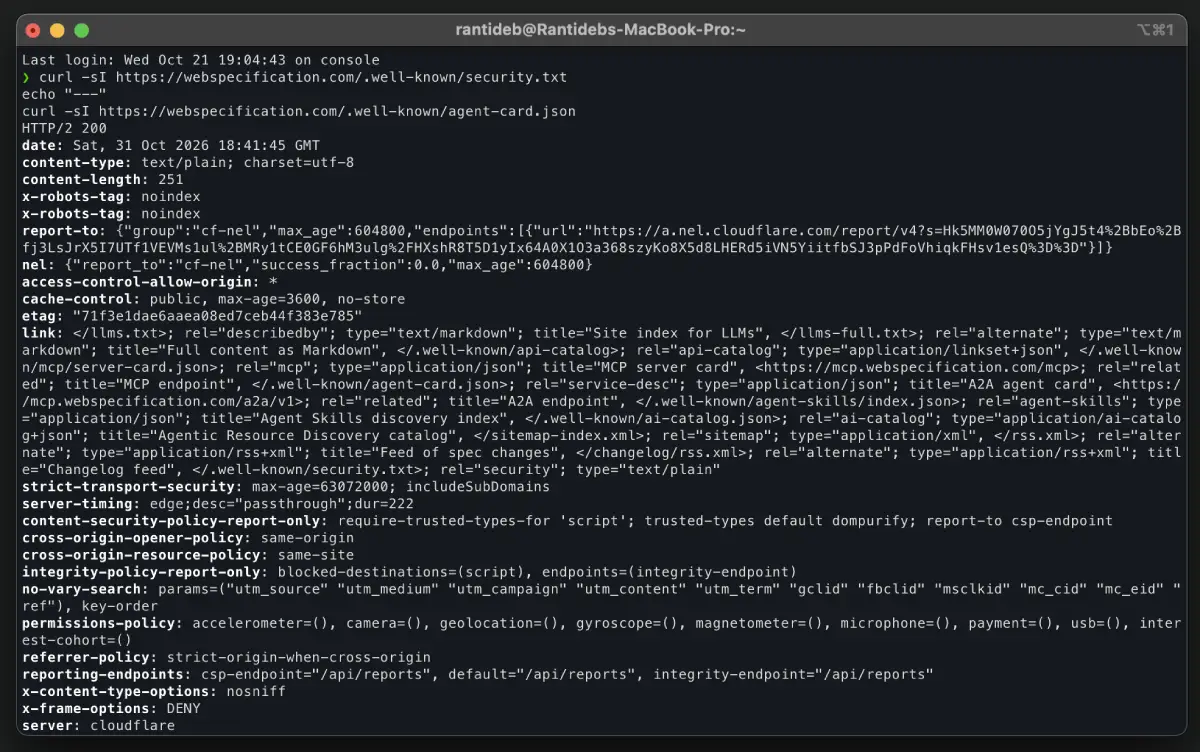
/.well-known/ endpoints on a production domain.| Diagnostic Check | Failure Symptom | Root Cause |
|---|---|---|
| Status + MIME | 200 OK with text/html | SPA catch-all router or CDN default MIME rule is intercepting the path |
| Payload prefix | Starts with <!DOCTYPE or <html | Client-side application shell is served instead of the static asset |
| Expires header | Empty output or past timestamp | RFC 9116 marks data as stale; automated scanners discard the payload |
agent.json check | Returns 200 OK instead of 301 | Serving the legacy draft path; modern A2A clients expect agent-card.json |
Standards and specification reference
This article references primary Internet standards, protocol drafts, and edge verification patterns:
- Primary specifications: RFC 8615 (Well-Known URIs), RFC 9116 (Vulnerability Disclosure), RFC 8809 (Password Change URLs), RFC 8461 (MTA-STS), the Linux Foundation Agent-to-Agent (A2A) Protocol Specification, and the W3C Global Privacy Control specification.
- IANA registry verification: Verified against the IANA Well-Known URIs registry on 1 November 2026 for status, registration dates, and reference standards.
- Edge inspection: Direct HTTP response verification executed via external network requests against edge hosting environments to identify MIME type overwrites and routing conflicts.
- Automated endpoint validation: Protocol conformance checks evaluating live metadata endpoints via automated scanner tools.
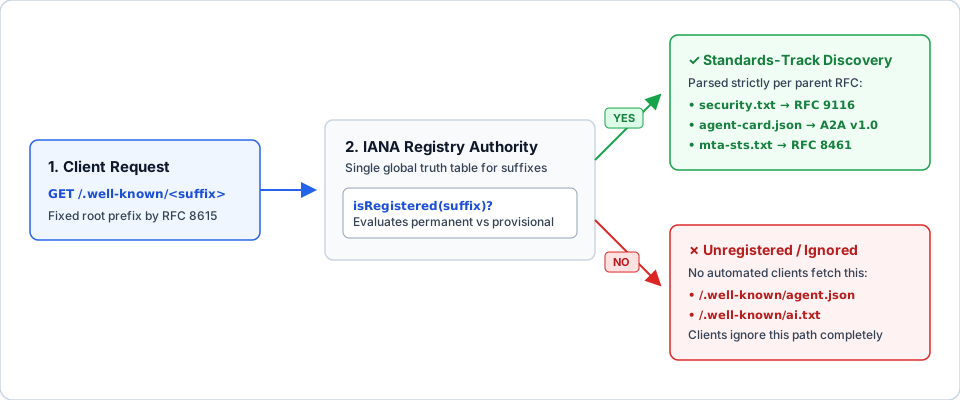
How RFC 8615 works: What the standard guarantees (and what it does not)
RFC 8615 (Well-Known Uniform Resource Identifiers) is an IETF standard (obsoleting RFC 5785) that reserves the /.well-known/ path prefix on HTTP and HTTPS origins for locating origin-wide policy metadata and service discovery documents.
The specification’s architectural scope is deliberately narrow:
- Reserved root namespace: RFC 8615 reserves
/.well-known/at the origin root (https://example.com/.well-known/<suffix>). Unless a specific protocol explicitly allows sub-path discovery, well-known URIs apply strictly to the root origin. - Centralized IANA registry: It designates the Internet Assigned Numbers Authority (IANA) to maintain the official registry of well-known suffixes to prevent naming collisions.
- Strict payload delegation: RFC 8615 defines zero file schemas. Each registered suffix delegates its syntax, HTTP status codes, and MIME types to its own governing specification (such as RFC 9116 for
security.txt).
Why does this distinction matter for development teams? Because IANA registration creates client discovery semantics, not server routing magic. While you can place an arbitrary file like /.well-known/internal-config.json on your server, external crawlers, browsers, and AI orchestrators have no protocol mandate to request unregistered suffixes.
| Property | RFC 8615 Specification Rule |
|---|---|
| Core Standard | RFC 8615 (obsoletes RFC 5785) |
| URI Pattern | /.well-known/<registered-suffix> at the origin root |
| Registry Authority | IANA Well-Known URIs Registry |
| Payload Schema | Delegated to the suffix’s defining specification |
| Transport Security | Served over HTTPS at the origin root |
How IANA registration status dictates production safety
The IANA Well-Known URIs Registry classifies every registered suffix into one of four lifecycle states: permanent, provisional, deprecated, or obsoleted. Evaluating this status column before deploying an endpoint prevents your team from shipping abandoned protocols or maintaining dead configuration debt.
| IANA Status | Technical Definition | Production Rule |
|---|---|---|
permanent | IETF consensus-backed or mature standard passed formal expert review | Deploy: Safe for long-term production infrastructure |
provisional | Active specification or W3C/industry draft registered on a first-come basis | Deploy with version pinning: Monitor spec updates quarterly |
deprecated | Retained only for legacy backward compatibility; active use discouraged | Decommission: Migrate to replacement; do not introduce |
obsoleted | Formally withdrawn or superseded by a newer standard | Remove immediately: Return 404 or 410 Gone |
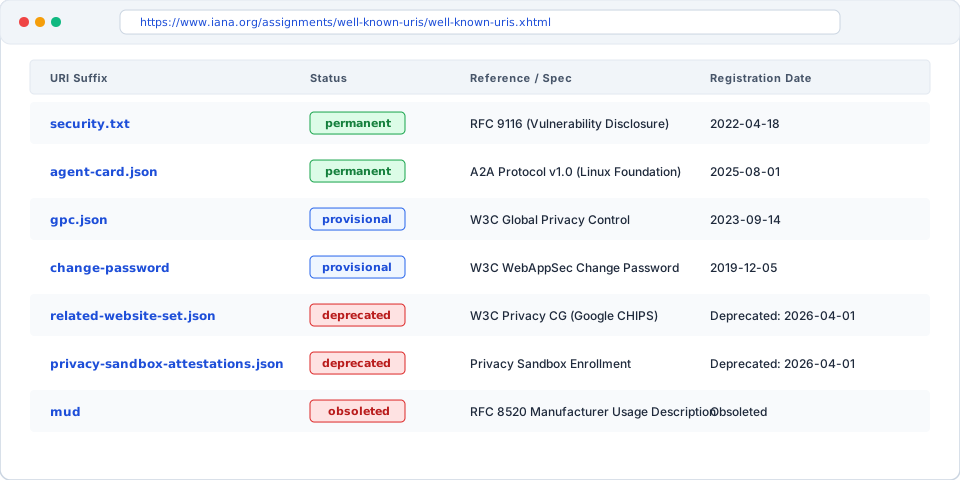
Real-world examples of registry churn
Web specifications evolve rapidly, and suffixes popularized by major browser vendors often get retired:
- Deprecated suffixes: Google’s Privacy Sandbox endpoints (
related-website-set.jsonandprivacy-sandbox-attestations.json) remain in the registry as deprecated for legacy compatibility, but active deployment is discouraged. - Obsoleted suffixes: Protocols like
http-opportunistic(RFC 8164) andmudhave been marked obsoleted.
Auditing your public/.well-known/ directory against the live IANA registry once per quarter ensures you aren’t serving deprecated attack surface.
Core discovery files: Schemas, edge rules, and CI automation
1. security.txt: Vulnerability disclosure (RFC 9116, Permanent)
/.well-known/security.txt (RFC 9116) is a permanent, machine-readable plaintext file that provides security researchers and automated vulnerability scanners with authoritative contact channels, PGP encryption keys, and disclosure policies.
Contact: mailto:security@webspecification.com
Expires: 2027-04-30T00:00:00.000Z
Encryption: https://webspecification.com/pgp-key.txt
Preferred-Languages: en
Canonical: https://webspecification.com/.well-known/security.txt
Policy: https://webspecification.com/security-policy
The RFC 9116 §2.5.5 Expiration Rule
Under RFC 9116, both Contact and Expires are mandatory fields. Section 2.5.5 states explicitly:
“Consumers of ‘security.txt’ SHOULD NOT use information from a file that is stale.”
If your Expires timestamp is in the past or missing entirely, automated triage pipelines and bug bounty platforms treat the entire file as untrusted.
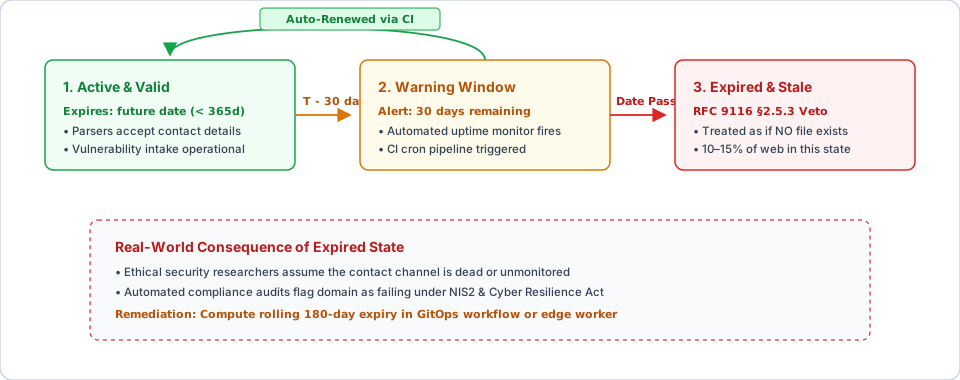
Three production failure patterns in security.txt
- The “Set-and-Forget” Expiry: Developers hardcode an expiration date during initial launch and never touch it again. Six months later, the file silently expires in production.
- Multi-Decade Timestamps (e.g.
2050-01-01): To avoid maintenance, teams set the expiry decades into the future. RFC 9116 §2.5.5 explicitly recommends settingExpiresless than a year ahead; strict security scanners flag multi-year timestamps as non-compliant. - Invalid RFC 3339 Formatting: Writing
Expires: 2027-01-01without the time and UTC offset (T00:00:00.000Z) violates RFC 3339 syntax and breaks strict parsers.
The Fix: Automated Rolling Expiry via GitHub Actions
Eliminate manual calendar reminders by automating a rolling 180-day expiration window on the first of every month:
# .github/workflows/refresh-security-txt.yml
name: Refresh security.txt
on:
  schedule:
    - cron: "0 0 1 * *"
  workflow_dispatch:

jobs:
  refresh:
    runs-on: ubuntu-latest
    permissions:
      contents: write
    steps:
      - uses: actions/checkout@v4
      - name: Generate security.txt with rolling 180-day RFC 3339 expiry
        run: |
          EXPIRES=$(date -u -d "+180 days" +"%Y-%m-%dT%H:%M:%S.000Z")
          mkdir -p public/.well-known
          cat > public/.well-known/security.txt <<EOF
          Contact: mailto:security@webspecification.com
          Expires: ${EXPIRES}
          Canonical: https://webspecification.com/.well-known/security.txt
          Preferred-Languages: en
          EOF
      - uses: stefanzweifel/git-auto-commit-action@v5
        with:
          commit_message: "chore(security): refresh security.txt rolling expiry"
2. agent-card.json: AI Agent Autonomous Discovery (A2A Protocol)
/.well-known/agent-card.json is defined by the Linux Foundation’s Agent-to-Agent (A2A) Protocol. It enables external orchestrator agents to programmatically discover an agent’s base endpoint, supported authentication schemes, streaming capabilities, and invocable skill schemas.
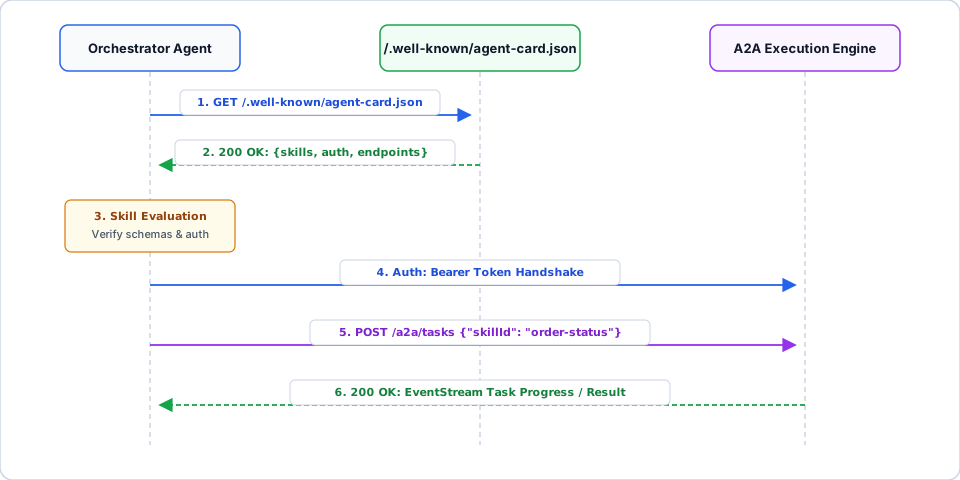
agent-card.json, matches user intent against skill schemas, and delegates the task.{
"name": "Specification Standards Agent",
"description": "Validates web specifications, RFC compliance, and agent discovery endpoints.",
"url": "https://webspecification.com/a2a",
"version": "1.0.0",
"provider": {
"organization": "Web Specification Studio",
"url": "https://webspecification.com"
},
"capabilities": {
"streaming": true,
"pushNotifications": false
},
"authentication": {
"schemes": ["Bearer"],
"credentials": "https://webspecification.com/a2a/auth"
},
"skills": [
{
"id": "standards-audit",
"name": "Web Standards Audit",
"description": "Performs remote inspection of well-known URIs and HTTP headers.",
"inputModes": ["text/plain"],
"outputModes": ["application/json"],
"examples": [
"Check security.txt RFC 9116 compliance for domain",
"Verify A2A agent-card.json schema and MIME headers"
]
}
]
}Why Skill.examples determines semantic routing accuracy
In the A2A Agent Card JSON schema, the top-level required fields are name, description, url, version, capabilities, and skills. Inside each skill object, examples (Skill.examples) is marked optional.
However, omitting examples hurts production discovery. When an orchestrator LLM evaluates multiple external agents to decide which one should handle a subtask, it uses description and examples as few-shot semantic anchors for intent classification. Including 2 to 4 concrete example queries per skill significantly increases routing precision.
Security Objection: Should you expose agent-card.json publicly?
A common question from security teams is: “Does publishing agent-card.json give attackers a blueprint of our internal AI endpoints?”
The architectural answer is Separation of Discovery and Authorization:
- Never list internal-only microservices in a public
/.well-known/agent-card.json. - Always enforce strict token validation (Bearer, OAuth2, or mTLS) on the execution
urldeclared in the card. The card advertises how to authenticate; it never grants unauthenticated execution privileges.
Migrating from legacy agent.json to agent-card.json
Early pre-release drafts of the A2A specification prior to mid-2025 used /.well-known/agent.json. The finalized specification standardized on /.well-known/agent-card.json.
To support legacy orchestrators without maintaining duplicate files, issue a permanent 301 redirect:
location = /.well-known/agent.json {
  return 301 /.well-known/agent-card.json;
}
3. agent-card.json (A2A) vs. mcp.json (MCP): Horizontal vs. Vertical Discovery
Developers building AI infrastructure frequently confuse the A2A Protocol (agent-card.json) with the Model Context Protocol (mcp.json). They operate at completely different layers of the AI stack:
- A2A (
agent-card.json) is Horizontal (Agent-to-Agent): It allows an independent peer agent to delegate a multi-step, asynchronous goal to another autonomous agent across domain boundaries without seeing the remote agent’s internal prompts, memory, or tools. - MCP (
mcp.json) is Vertical (Model-to-Tool): It connects a single host LLM runtime directly to deterministic tools, database connectors, and prompt templates for synchronous function calling.
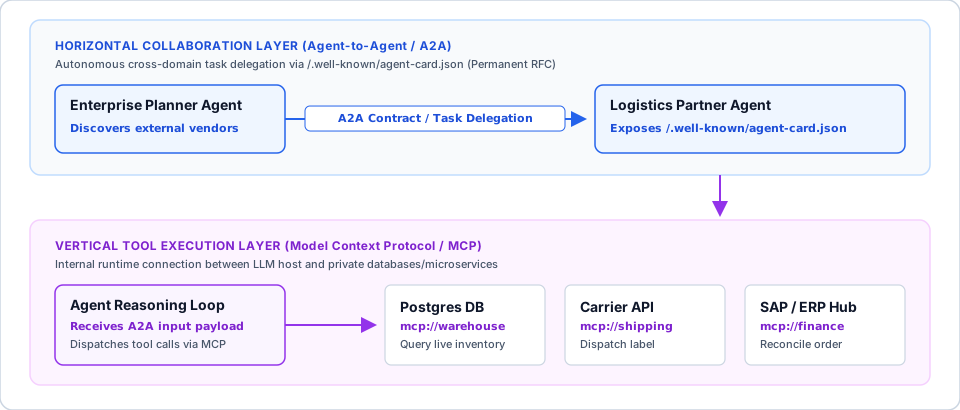
agent-card.json, while MCP operates vertically between a model runtime and local tool servers.| Architectural Dimension | agent-card.json (A2A Protocol) | mcp.json (Model Context Protocol) |
|---|---|---|
| Target Entity | Autonomous external peer agent | Deterministic tool, resource, or prompt server |
| Requesting Client | Orchestrator agent delegating a goal | Host LLM runtime attaching local/remote tools |
| Execution Pattern | Asynchronous, stateful task delegation | Synchronous, stateless RPC tool invocation |
| Topology | Horizontal: Peer Agent ↔ Peer Agent | Vertical: Host Model ↓ Tool Server |
| State Exposure | Opaque (internal reasoning and tools hidden) | Transparent (full JSON tool schema exposed to LLM) |
4. change-password: Credential Rotation Redirects (RFC 8809, Permanent)
/.well-known/change-password (RFC 8809) is a permanent well-known URI that enables password managers (1Password, Bitwarden, Apple Passwords, Google Password Manager) to take users directly to a site’s password update form when a breach alert or credential rotation is triggered.
Why RFC 8809 requires 302/303 instead of 301
RFC 8809 specifies that servers should respond with a temporary redirect (302 Found, 303 See Other, or 307 Temporary Redirect) to the actual password management page, and explicitly advises against 301 Moved Permanently.
If you return a 301, browsers and password managers cache the destination URL permanently. If your frontend team later refactors /settings/password to /account/security/credentials, users with cached 301 redirects hit broken 404 pages during security-critical password resets.
# Nginx: Temporary redirect for RFC 8809 compliance
location = /.well-known/change-password {
  return 302 /account/security/password;
}
# Apache (.htaccess)
RedirectMatch 302 ^/\.well-known/change-password$ /account/security/password5. mta-sts.txt (RFC 8461) and gpc.json (W3C GPC)
mta-sts.txt: Inbound SMTP TLS Enforcement (RFC 8461, Permanent)
/.well-known/mta-sts.txt enforces TLS encryption and certificate validation for inbound SMTP email traffic, preventing downgrade and man-in-the-middle (MitM) attacks on mail servers.
version: STSv1
mode: enforce
mx: mail.webspecification.com
max_age: 604800- Prerequisite DNS Records: The HTTPS file only activates when paired with
_mta-sts.yourdomain.comand_smtp._tls.yourdomain.comDNS TXT records. - Rollout Safety: Always deploy in
mode: testingfirst and monitor TLS-RPT failure reports before switching tomode: enforce. (Note: If your MX records point entirely to Google Workspace or Microsoft 365 without custom mail relays, mail transport is managed on their infrastructure.)
gpc.json: Global Privacy Control Signal (W3C Provisional)
/.well-known/gpc.json is a W3C provisional manifest declaring that an origin detects and honors the Sec-GPC: 1 HTTP request header under privacy laws such as the CCPA and GDPR.
{
  "gpc": true,
  "lastUpdate": "2026-11-01"
}
Legal & Compliance Warning: Never deploy
gpc.jsonas static boilerplate unless your backend and Consent Management Platform (CMP) actively suppress third-party ad trackers whenSec-GPC: 1is received. Publicly asserting"gpc": truewhile ignoring the signal creates direct regulatory liability for deceptive privacy practices.
6. Identity, OAuth, and Mobile Deep-Linking Suffixes
For domains operating authentication servers or native mobile apps, four permanent IANA suffixes form the backbone of platform discovery:
openid-configuration: OpenID Connect (OIDC) Discovery 1.0 document queried by auth SDKs to locate JWKS keys and token endpoints.oauth-authorization-server&oauth-protected-resource: OAuth 2.0 metadata manifests defined in RFC 8414 and RFC 9728.webfinger: RFC 7033 account discovery endpoint used across federated protocols (ActivityPub, Mastodon, OIDC).assetlinks.json&apple-app-site-association: Cryptographic domain verification files required for Android App Links and iOS Universal Links.
Why llms.txt and ai.txt do NOT belong in /.well-known/
Neither llms.txt nor ai.txt is registered in the IANA Well-Known URIs Registry. They are informal, community-driven conventions rather than IETF or W3C standards:
- Root path convention: The
llms.txtproposal specifies placing a Markdown index at the root path (/llms.txt), not at/.well-known/llms.txt. - Zero RFC 8615 semantics: Putting
llms.txtinside/.well-known/violates the convention expected by tools that support/llms.txtwhile still failing to qualify as a registered RFC 8615 standard.
If you publish /llms.txt to supply clean Markdown documentation for LLM context windows, serve it at the root /llms.txt path. For related specifications on machine-readable discovery and crawler controls, see the llms.txt standard and robots.txt directives for AI web crawlers.
Case Study: Production edge verification on webspecification.com
To illustrate how a hardened edge configuration behaves in the wild, here is the live verification table from webspecification.com running on a static edge architecture:
| Endpoint Path | HTTP Status | Edge Content-Type | Architectural Justification |
|---|---|---|---|
/.well-known/security.txt | 200 OK | text/plain; charset=utf-8 | Active RFC 9116 file with automated 180-day rolling Expires timestamp. |
/.well-known/agent-card.json | 200 OK | application/json | Valid A2A Protocol manifest with populated Skill.examples arrays. |
/.well-known/gpc.json | 200 OK | application/json | Serves {"gpc": true}; synchronized with edge consent handling. |
/.well-known/change-password | 302 Found | None | Temporary redirect to /account/security/password per RFC 8809. |
/.well-known/oauth-protected-resource | 410 Gone | text/plain | Intentional 410 with X-Robots-Tag: noindex. No OAuth resource server. |
/.well-known/webauthn | 410 Gone | text/plain | Intentional 410. No cross-origin WebAuthn relying party origins. |
/.well-known/mta-sts.txt | 404 Not Found | None | Expected 404. Inbound mail is handled by external MX infrastructure. |
The 410 Gone Pattern for Unused Auth Endpoints
Why return 410 Gone on oauth-protected-resource and webauthn instead of letting them fall through to a 404?
- Stopping Scanner Retry Loops: A
404 Not Foundsignals temporary or undetermined absence, causing aggressive OAuth/OIDC discovery clients and vulnerability scanners to re-poll the endpoint on backoff schedules. - Definitive Negative Caching: An HTTP
410 Gonepaired withX-Robots-Tag: noindexexplicitly tells automated clients that the protocol is permanently absent on this origin, reducing edge log noise and bot bandwidth.
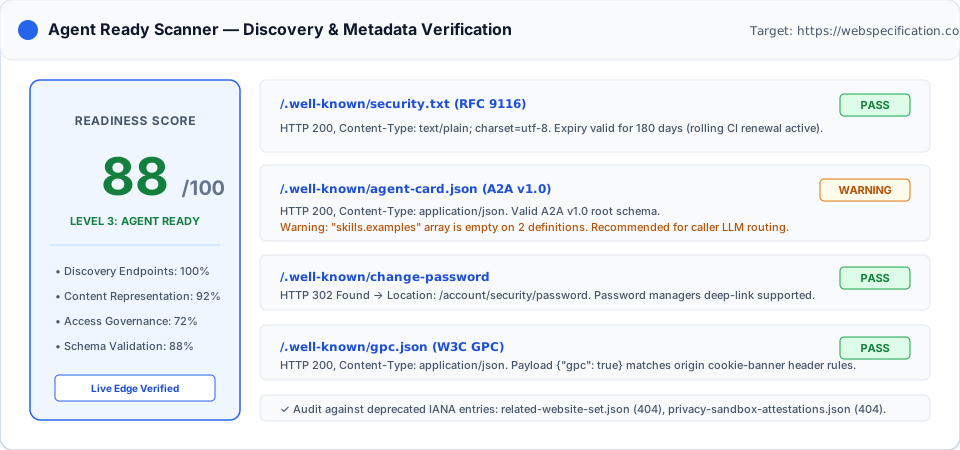
webspecification.com: security.txt and agent-card.json pass verification, with an informational advisory regarding optional examples arrays.Endpoint verification results
| Verification Check | Status | Technical Details |
|---|---|---|
security.txt present | Pass | HTTP 200, text/plain, valid Expires date. |
security.txt timestamp validity | Pass | Rolling expiry set within 180 days. |
agent-card.json discovery | Pass | HTTP 200, application/json, conforms to A2A schema. |
agent-card.json schema validation | Advisory | Optional examples array omitted on two skill objects. |
change-password status | Pass | HTTP 302 redirect to account settings. |
gpc.json compliance | Pass | Returns {"gpc": true} with valid JSON content type. |
| Deprecated paths | Pass | No deprecated IANA suffixes return HTTP 200. |
Common production failure modes and copy-paste edge fixes
Even seasoned infrastructure teams hit four recurring traps when deploying /.well-known/ files through modern frameworks and CDNs.
Failure 1: The SPA Catch-All Intercept
Client-side frameworks (Next.js, Remix, Vue Router, SvelteKit) frequently use a wildcard route or middleware that rewrites unrecognized paths to index.html. When a scanner requests /.well-known/security.txt, the server returns 200 OK with an HTML shell (<!DOCTYPE html>). Every spec-compliant parser rejects the response immediately.
Fix for Next.js / Edge Middleware (middleware.ts): Exclude \.well-known from your middleware matcher regex so requests hit static storage directly:
// middleware.ts - Exclude .well-known from client router rewriting
export const config = {
  matcher: [
    "/((?!_next/static|_next/image|favicon\\.ico|\\.well-known).*)",
  ],
};
Fix for Nginx (nginx.conf): Use the ^~ prefix modifier so Nginx halts regex matching and serves /.well-known/ directly from disk with strict 404 fallback:
location ^~ /.well-known/ {
  root /var/www/html;
  default_type text/plain;
  try_files $uri =404;
}
Failure 2: Dot-Prefixed Directories Stripped During Build Passes
Static site generators (Eleventy, Jekyll, Astro, Hugo) and deployment sync scripts (such as rsync or S3 sync patterns) often ignore files and directories starting with a dot (.). Your .well-known folder exists in Git, but vanishes from the final production build artifact.
The Fix: Place .well-known inside your framework’s passthrough static folder (e.g., public/.well-known/) or explicitly enable dotfiles in your bundler configuration (for example, keep_files: [".well-known"] or dot: true), and add a CI assertion step (test -f dist/.well-known/security.txt) before deployment.
Failure 3: CDN MIME-Type Overwrites and Missing nosniff Headers
Even when the file deploys properly, CDN edge nodes (Cloudflare, Vercel, Netlify, CloudFront) can serve extensionless files or unrecognized manifests with a default Content-Type: text/html or application/octet-stream.
Fix for Cloudflare Pages / Netlify (public/_headers): Lock in explicit MIME types and attach X-Content-Type-Options: nosniff so browsers and parsers never guess the payload type:
/.well-known/security.txt
  Content-Type: text/plain; charset=utf-8
  X-Content-Type-Options: nosniff
  Cache-Control: public, max-age=86400

/.well-known/agent-card.json
  Content-Type: application/json; charset=utf-8
  X-Content-Type-Options: nosniff
  Access-Control-Allow-Origin: *
  Cache-Control: public, max-age=3600

/.well-known/gpc.json
  Content-Type: application/json; charset=utf-8
  X-Content-Type-Options: nosniff
Fix for Vercel (vercel.json):
{
  "headers": [
    {
      "source": "/.well-known/security.txt",
      "headers": [
        { "key": "Content-Type", "value": "text/plain; charset=utf-8" },
        { "key": "X-Content-Type-Options", "value": "nosniff" }
      ]
    },
    {
      "source": "/.well-known/agent-card.json",
      "headers": [
        { "key": "Content-Type", "value": "application/json; charset=utf-8" },
        { "key": "Access-Control-Allow-Origin", "value": "*" },
        { "key": "X-Content-Type-Options", "value": "nosniff" }
      ]
    }
  ],
  "redirects": [
    {
      "source": "/.well-known/agent.json",
      "destination": "/.well-known/agent-card.json",
      "permanent": true
    },
    {
      "source": "/.well-known/change-password",
      "destination": "/account/security/password",
      "permanent": false
    }
  ]
}
Note the Access-Control-Allow-Origin: * header on agent-card.json. This allows browser-based AI agent playgrounds and cross-origin orchestrators to inspect your agent card without CORS failures.
Failure 4: Serving Deprecated or Obsoleted Endpoints
Registry statuses change over time. Suffixes that were once standard recommendations gradually become legacy baggage.
Leaving deprecated endpoints active (like Google’s legacy privacy attestations) or serving dead drafts causes automated tools to run unnecessary audits against outdated specs.
Audit deployed paths against the official IANA registry once a quarter, and retire obsolete configuration entries cleanly.
Frequently Asked Questions (FAQ)
Does security.txt work if placed in the root directory (/security.txt) instead of /.well-known/security.txt?
RFC 9116 §3 stipulates that /.well-known/security.txt is the primary canonical location. While legacy scanners may fall back to /security.txt at the root directory for backward compatibility, modern automated triage tools query /.well-known/security.txt first. Always deploy the file inside /.well-known/ and optionally redirect /security.txt to /.well-known/security.txt.
Can I deploy /.well-known/ files on a subdirectory path like https://example.com/app/.well-known/?
No. Under RFC 8615 §3, well-known URIs are rooted at the top-level origin path (/.well-known/). Unless a specific suffix specification explicitly defines subdirectory lookup behavior (such as certain OAuth 2.0 issuer paths under RFC 8414), external clients will only query the root of the domain.
What is the difference between agent-card.json, mcp.json, and llms.txt?
Each file serves a distinct layer of the AI ecosystem:
/.well-known/agent-card.json(A2A Protocol): Standardizes horizontal agent-to-agent discovery and asynchronous task delegation.mcp.json(Model Context Protocol): Configures vertical host-to-tool server connections for synchronous LLM function calling./llms.txt(Community Convention): Provides a root-level Markdown sitemap designed to help LLMs ingest site documentation cleanly.
Key takeaways & next steps
Treating /.well-known/ as an afterthought leaves your vulnerability disclosure channels stale and your AI agent services invisible to external orchestrators.
Before closing your terminal, run the 4-command curl diagnostic above against your production domain, add the rolling security.txt GitHub Action to your repository, and lock in explicit Content-Type and nosniff headers at your CDN edge.
If you are architecting infrastructure for autonomous agents and modern web standards, explore the next layer of the stack in our companion guides: Building an Agent-Ready Web Architecture and HTTP Content Negotiation for AI Agents.
Changelog
- 2026-11-01: Upgraded with Vercel/Cloudflare edge configurations, CORS and
nosniffheader rules foragent-card.json, security objection handling for public agent discovery, and structured FAQ blocks. Verified all RFC 8615, RFC 9116 §2.5.5, RFC 8809, and A2A Protocol specifications against the IANA registry as of 1 November 2026. - 2026-10-31: Initial publication documenting
/.well-known/discovery architecture, first-party edge testing onwebspecification.com, and A2A vs. MCP comparison. - Next scheduled review: 2026-11-30.

Written by
Platform Engineer and Technical Writer with 10+ years of full-stack development experience and 2+ years focused on DevOps and platform engineering.